
Tomofon

Real Audio Synth

NEW! Dreamscapes & Pop Proteins Expansion Packs

Punch Meets Pillow

Two brand new expansions built to spark ideas. Whether you’re chasing hooks or sculpting textures, Dreamscapes and Pop Proteins opens new directions, bridging the energy of the dance floor with the glow of the after hours.

Express yourself

Updated to v1.2!

MPE (MIDI Polyphonic Expression) support, body resonance, multiple filter types and much more.

🏆 Voted "One of the best synthesizers of 2023" by Plugin Boutique users

🔥 Mentioned in Andrew Huang's highly anticipated "Top 10 plug-ins of 2023"

Tomofon is a ground-breaking expressive audio synth. This virtual instrument introduces a new “Audio Model” format, capable of containing thousands of waves extracted from ordinary audio files. These waves - and how they’re structured - lays the ground for how Tomofon generates audio, resulting in a highly flexible and instantly expressive instrument, that on one hand sounds very organic, and on the other like something out of this world. Whether you want to play around with the Audio Model Starter Pack (instruments & voices) and factory presets, or import your own audio to shape your own unique soundscapes – it is fair to say that you are in for a creative journey. With the addition of MPE support in v1.2, the expressiveness is taken even further!

How does it work?

Tomofon converts audio files into a large set of oscillating waves, which then are mapped into pitch zones where each wave represents one layer (a bit similar to how a sampler structures different velocity zones). The main difference is that since each zone is populated with waves instead of ordinary samples, the synth engine can morph between them (both layers and zones). This makes all transitions between zones and layers continuous and seamless. This structure containing these organized wavetables is what we call an Audio Model, and give Tomofon its dynamic properties and characteristic sound.

Illustrated description of the Audio Model concept can be found under "Anatomy" below

Create and share your own unique sounds

A significant feature of this plug-in is that users can import their own audio files and create new and unique Audio Models. Ordinary audio files (preferably with monophonic content) can easily be imported and distributed into different pitch zones over the keyboard range, either automatically or manually. Doing an automatic import is basically a one-click process which instantly results in a proper playable Audio Model. A manual import gives the user full control of which waves should end up in which pitch zone. Last but not least you can easily share your own created Audio Models with others.

Tomofon comes pre-loaded with a pack of 124 Audio Models based on high quality audio recordings of multiple expressions. These models includes several instrument like strings, vocals, brass, woodwind, guitars and more. Along with these models there are over 180 presets to get you going right away. From there on you can venture further and start creating Audio Models based on your own audio files and experiment on the types of sounds they can grow to be.
macOS/Windows

Tomofon
AUVSTAAX
$129.99Shop Now

iPad

Tomofon
AUv3Standalone
$24.99Download on the App Store

Features:

  • Wide selection of factory models and presets
  • Integrated audio sample importer and Audio Model editor
  • Pitch and (layer) depth envelopes that can be edited by the user
  • Envelope times can separately be controlled via MIDI velocity
  • Several LFO’s (including Sample and Hold with randomness)
  • Modulation matrix (2 x MIDI CC, Velocity and Keymap)
  • Monophonic playback with separate glide times for pitch and velocity
  • Polyphonic legato playback where started notes syncs envelopes with currently playing ones
  • Up to 4 doubling voices with separate pitch, pan and level
  • Filter with modulation possibilities
  • Post Reverb, Delay and EQ
  • v1.1Resizeable window
  • v1.2MPE support (MIDI Polyphonic Expression)
  • v1.2Physical "body" simulations
  • v1.2Different filter types (LP, HP, BP in both 12 and 24 db/oct)
  • v1.2Custom tunings support (opens .tun files)

Technical specifications

macOS
Windows

Requires macOS 10.10 or later (optimized for the M1-processor), Windows 7 (SP1) or later, running a AU, VST or AAX compatible 64-bit host.

"Our objective with the import feature in Tomofon was to create an inclusive environment, where users can import and edit their samples to craft perfected synth models, but also bring random stuff like a cat meow and still achieve a playable result."

– Sebastian Rilton (Designer)

The Audio Model Editor offers a fluid workflow, automatically importing audio files and organizing them into sorted wavetables, but also with many options for manual control. Precise editing of wavetables for each pitch zone makes it easy to sculpt any sound into a playable instrument.

"While it looks deceptively slight, Tomofon contains a lot of sound design potential, which becomes clear even within the first few minutes of messing around with it. Those who want to put the extra time in with the editor can create some really expressive and lifelike instrument timbres, although there’s also a lot of quick and easy fun to be had for those who just want to mess around with weird audio sources too – and they will often be rewarded with truly epic results for their efforts to boot."

– MusicRadar

Videos

Overview

Let's get technical!

Loney Dear & Tomofon 1.2

Loney Dear (Emil Svanängen) and Emanuel Lundgren took the new Tomofon 1.2 a spin

"One of the best synths of 2023"

Explained in 1 min by Andrew Huang

Tomofon - Editor Tutorial

A detailed walkthrough of how you can make and edit your own Audio Models in Tomofon.

Tomofon MPE lab

Tomofon v1.2 introduces MPE support that lets you use pitch bend and controllers in a polyphonic manner

Tomofon - iOS

You are in for a creative journey

Tomofon - Deep house jam

Elias demos some factory presets of Tomofon in this jam

Create your own Audio Models

Lucas creates an Audio Model from an electric guitar sample

Synthesize your own voice

What happens when you put your own voice in Tomofon?

Anatomy

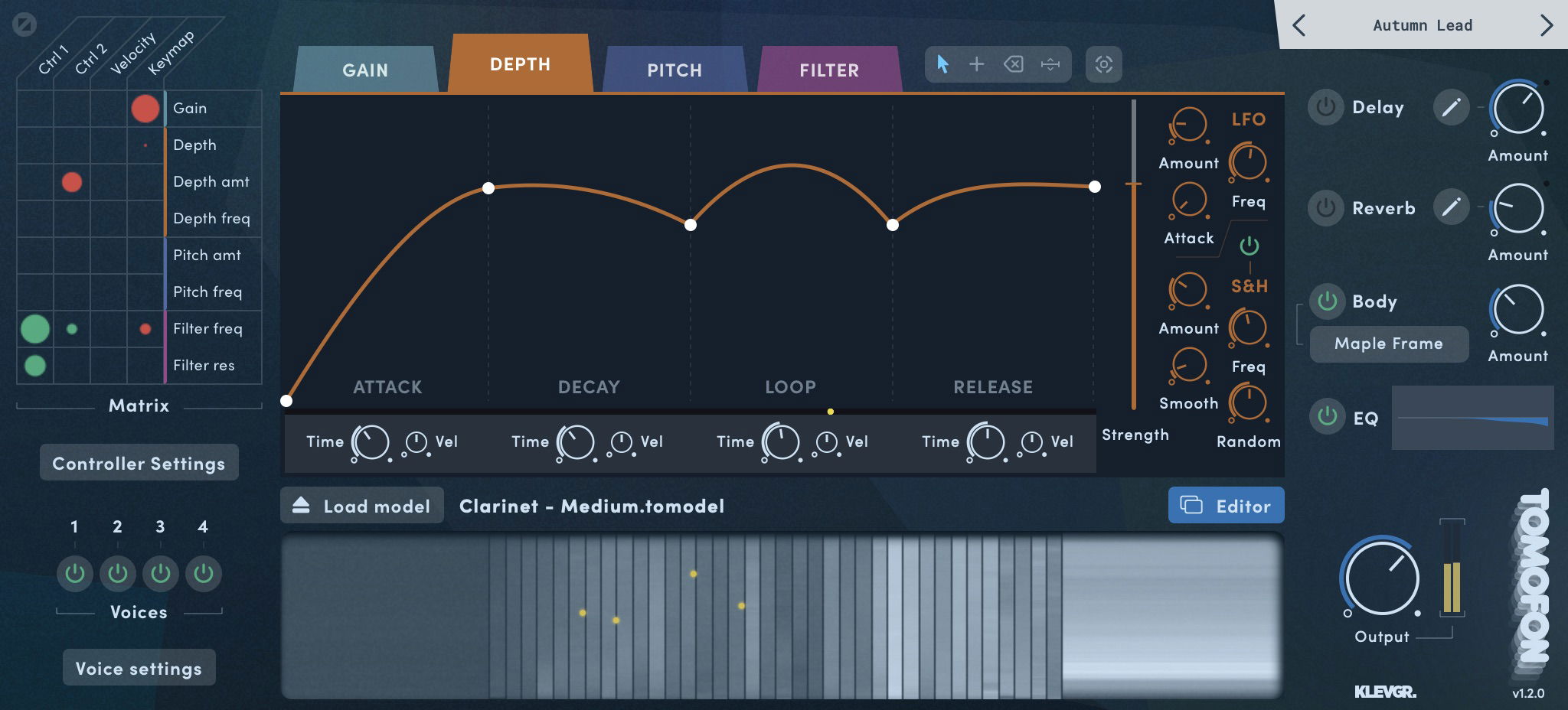
Synth section

Synth section
1
2
3
4
5
1

Super modeling

A quick overview of the loaded audio model, and the currently playing tones (represented by yellow dots)

2

Matrix

The matrix sets how much each controller (top) modulates each target (right)

3

Enveloope

The envelope section lets you set the Attack, Decay, Loop and Release behaviour of each note. There's an envelope for Gain, Depth, Pitch and Filter.

4

More & merrier

Some of the envelopes also have additional functions for modulating the envelope.

5

Ready, Preset, Go

Although we're encouraging you to shape your own sounds with Tomofon, we've added more presets than you'll need.

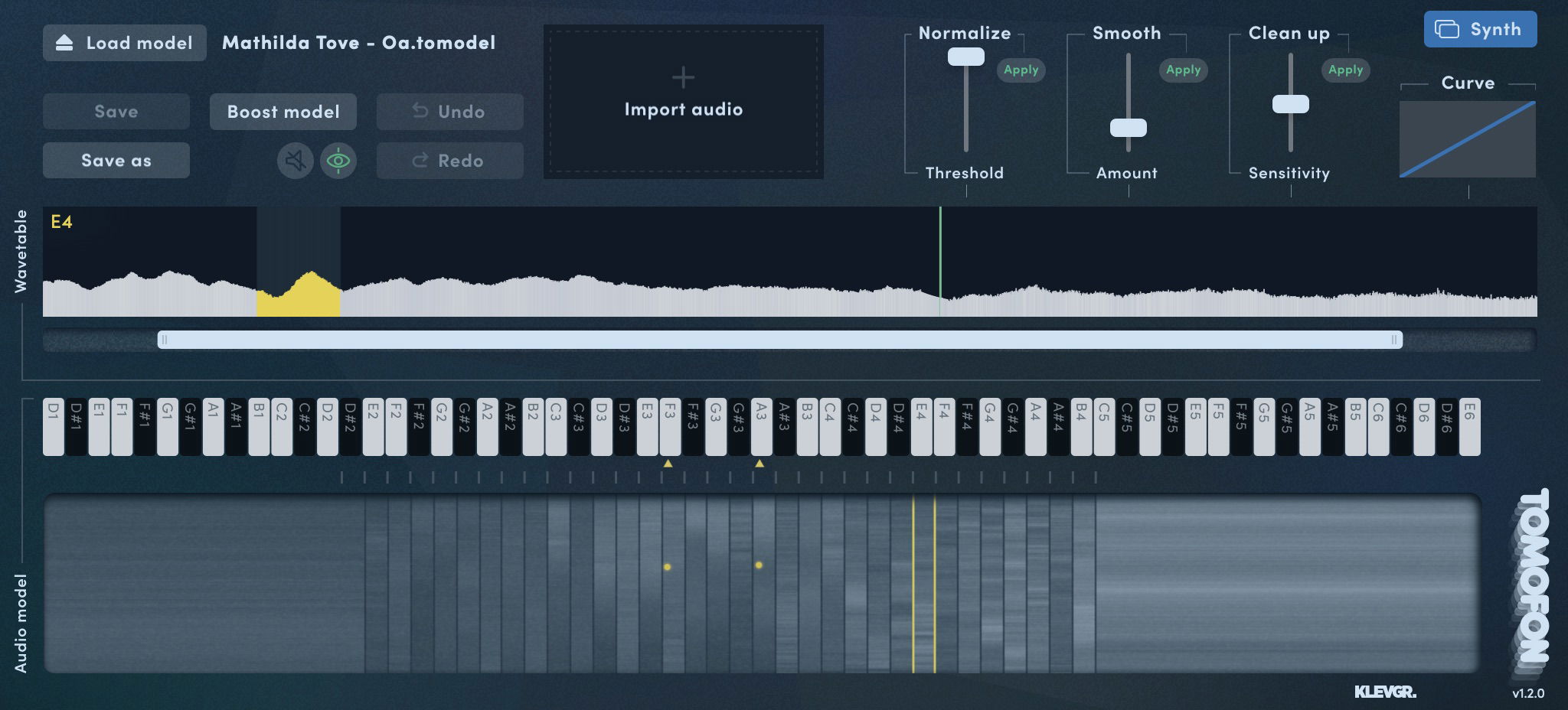
Audio model editor

Audio model editor
1
2
3
4
1

Follow your flow

Import any audio file, and Tomofon will extract and organize it into playable waves. If you want more control of the process, the import can be managed in several different manual ways.

2

Pave the way for the wave

Each pitch zone has a wave table, which can be edited in several ways.

3

Audio model navigator

The visual representation of an Audio model, with the different pitch zones as columns. The Y axis represents the wave's depth.

4

Wavetable Actions

Handy functions for quickly managing the selected wavetable.

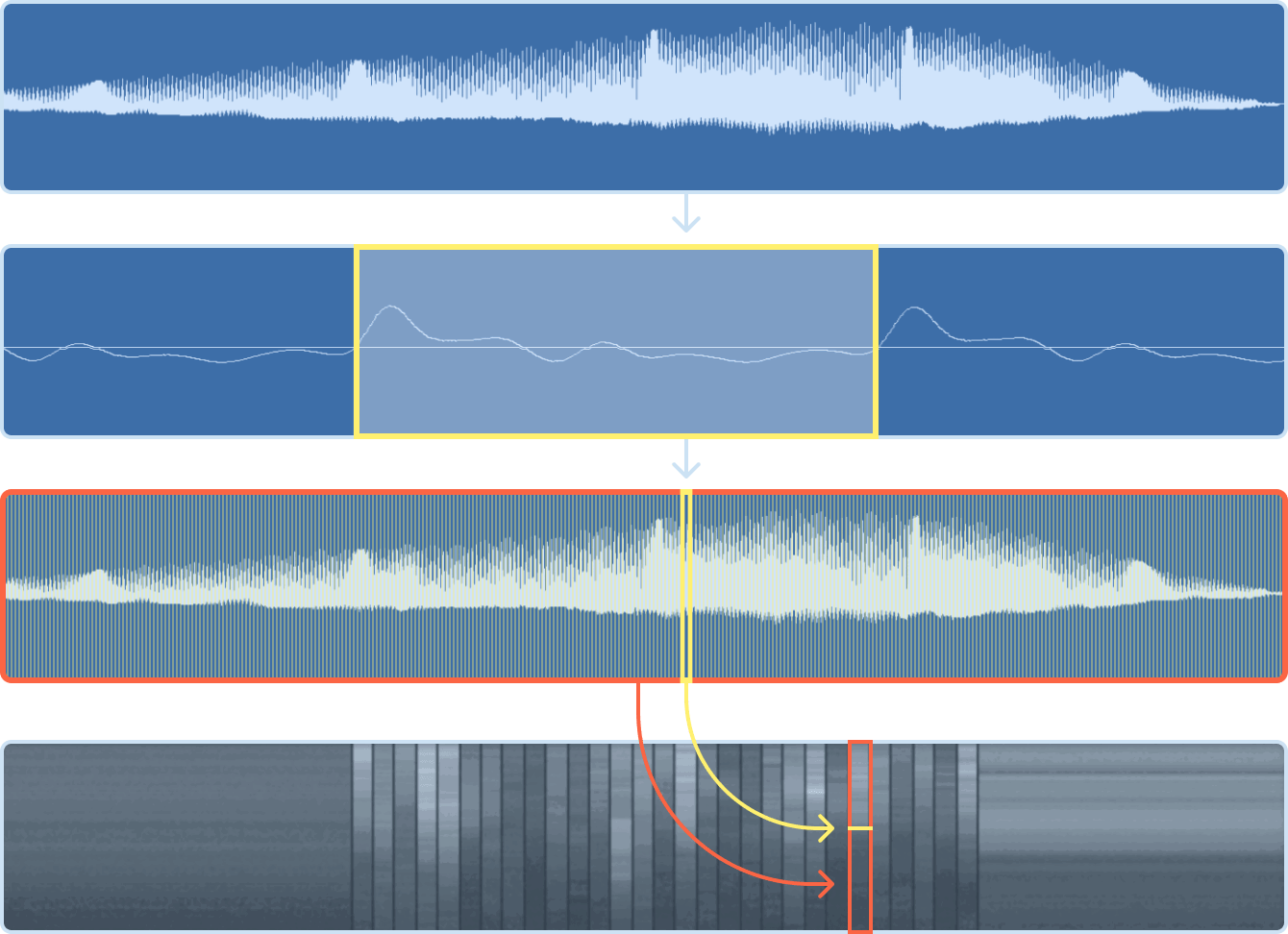
How Audio Models work

How Audio Models work
1
2
3
4
1

Source Audio

A regular audio file is imported into Tomofon. In this example a male singer, changing his formants throughout the note.

2

Single wave

Zoomed in on a small portion of the same audio file as above. One cycle (marked in yellow) gets extracted to one single wave.

3

Wavetable

Through this process, the sample audio is divided into hundreds of waves resulting in one wavetable. In effect a sort of reconstruction of the original audio.

4

Audio Model

The wavetable is then mapped onto pitch zones across a keyboard of several octaves.

More waves to surf

While Tomofon is already packed with a huge library of sounds, you can expand your sonic universe even further with the available expansion packs. We offer both sounds designed in-house, and also from from some of our favourite artists and sound designers in the world.

Read more

Real Audio Synthesis

What is Tomofon really about?

Welcome Tomofon v1.2 and Loney Tunes!

A major update, adding MPE support, body resonance and much more

Downloads

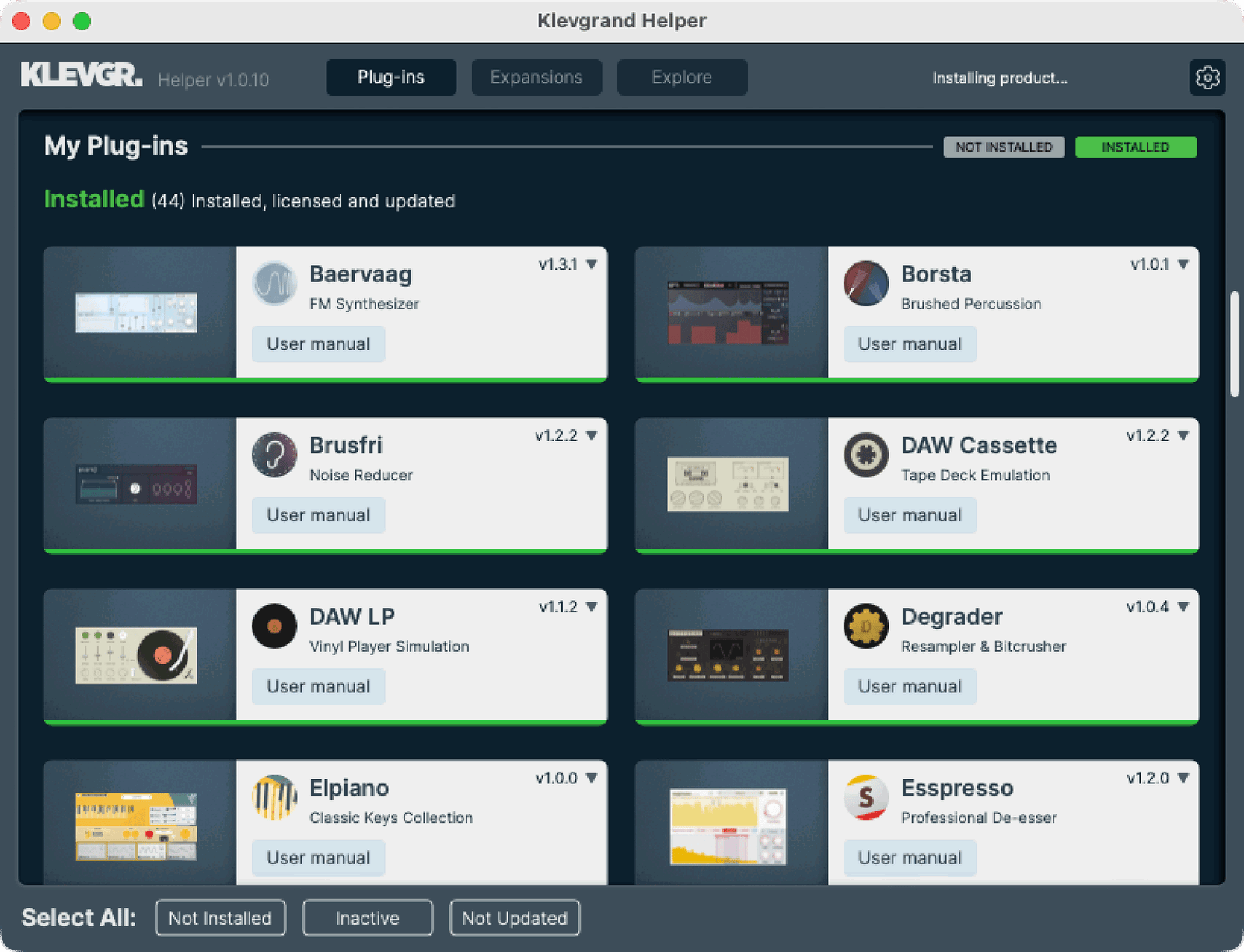
Klevgrand Helper

Klevgrand Helper streamlines updates, installations and license activations for all your Klevgrand plugins and expansions. Sign in with your Klevgrand account and prepare for a smooth experience with Klevgrand Helper.

UI of Klevgrand Helper

Tomofon Downloads

Legacy downloads below
Demo version == Full version
All our plugins can be downloaded and tested for free. The demo is the full version, but with occasional audio dropouts.
macOSmacOS version
Tomofon v1.2.2
Download
Show Changelog

Tomofon

v1.2.2

  • Fixed UI issue when loading .tun files (windows)

  • Prevented crash when opening some presets while using a VST3 instance.

v1.2.1

  • Recognizes files with .aiff extension (did only work with .aif earlier)

v1.2.0 2023-06-26

  • Added MPE Support

  • Added a Body parameter that simulates different instrument bodies and materials

  • Added filter types (now there is LP, HP, BP in both 12 db/oct and 24 db/oct)

  • Zoom and Scroll functionality in Audio Model Editor

  • Controller sources (and MPE state) can be locked so they won't change when loading a new preset

  • Custom tunings support (opens .tun files)

  • Pitch Zone graphical representation are now rendered inside the curve tool.

  • FIX: Ctrl-clicking om macOS now behaves the same as right mouse button

  • FIX: Delay width now defaults to mono (when double clicking the knob)

  • FIX: Added a notification popup when an imported audio file doesn't contain any valid waves

  • FIX: Importing an exported preset will now search in the same directory for the model.

v1.1.1

  • (iOS only) Added model packs functionality

v1.1.0

  • Added window resizing functionality (desktop only).

  • Channel Aftertouch now available as a controller input source.

  • New plugin parameter: Pitch Zone Lookup Offset - Decouples the relation between output pitch and pitch zone.

  • Added master tuning as a plugin parameter.

  • Pitch Envelope nodes can be set to zero (exact middle) by double clicking a node.

  • Model visualizations now reflects pitch zone curve settings.

  • Model Editor shows pitch of each note played near the keyboard view.

  • Fix: Importing stereo mp3 files in certain windows versions does not cause crashes anymore.

  • Fix: Scaling a pitch envelope doesn't mess up curve values anymore.

  • Added native ARM (Apple Silicon) support for AAX

v1.0.0

  • Initial release
WindowsWindows version
Tomofon v1.2.2
Download
Show Changelog

Tomofon

v1.2.2

  • Fixed UI issue when loading .tun files (windows)

  • Prevented crash when opening some presets while using a VST3 instance.

v1.2.1

  • Recognizes files with .aiff extension (did only work with .aif earlier)

v1.2.0 2023-06-26

  • Added MPE Support

  • Added a Body parameter that simulates different instrument bodies and materials

  • Added filter types (now there is LP, HP, BP in both 12 db/oct and 24 db/oct)

  • Zoom and Scroll functionality in Audio Model Editor

  • Controller sources (and MPE state) can be locked so they won't change when loading a new preset

  • Custom tunings support (opens .tun files)

  • Pitch Zone graphical representation are now rendered inside the curve tool.

  • FIX: Ctrl-clicking om macOS now behaves the same as right mouse button

  • FIX: Delay width now defaults to mono (when double clicking the knob)

  • FIX: Added a notification popup when an imported audio file doesn't contain any valid waves

  • FIX: Importing an exported preset will now search in the same directory for the model.

v1.1.1

  • (iOS only) Added model packs functionality

v1.1.0

  • Added window resizing functionality (desktop only).

  • Channel Aftertouch now available as a controller input source.

  • New plugin parameter: Pitch Zone Lookup Offset - Decouples the relation between output pitch and pitch zone.

  • Added master tuning as a plugin parameter.

  • Pitch Envelope nodes can be set to zero (exact middle) by double clicking a node.

  • Model visualizations now reflects pitch zone curve settings.

  • Model Editor shows pitch of each note played near the keyboard view.

  • Fix: Importing stereo mp3 files in certain windows versions does not cause crashes anymore.

  • Fix: Scaling a pitch envelope doesn't mess up curve values anymore.

  • Added native ARM (Apple Silicon) support for AAX

v1.0.0

  • Initial release
Show Legacy Downloads
WindowsWindows versionLegacy
Tomofon v1.0.0
Download
Show Changelog

Tomofon

v1.0.0

  • Initial release
macOSmacOS versionLegacy
Tomofon v1.0.0
Download
Show Changelog

Tomofon

v1.0.0

  • Initial release
macOSmacOS versionLegacy
Tomofon v1.1.0
Download
Show Changelog

Tomofon

v1.1.0

  • Added window resizing functionality (desktop only).

  • Channel Aftertouch now available as a controller input source.

  • New plugin parameter: Pitch Zone Lookup Offset - Decouples the relation between output pitch and pitch zone.

  • Added master tuning as a plugin parameter.

  • Pitch Envelope nodes can be set to zero (exact middle) by double clicking a node.

  • Model visualizations now reflects pitch zone curve settings.

  • Model Editor shows pitch of each note played near the keyboard view.

  • Fix: Importing stereo mp3 files in certain windows versions does not cause crashes anymore.

  • Fix: Scaling a pitch envelope doesn't mess up curve values anymore.

  • Added native ARM (Apple Silicon) support for AAX

v1.0.0

  • Initial release
WindowsWindows versionLegacy
Tomofon v1.1.0
Download
Show Changelog

Tomofon

v1.1.0

  • Added window resizing functionality (desktop only).

  • Channel Aftertouch now available as a controller input source.

  • New plugin parameter: Pitch Zone Lookup Offset - Decouples the relation between output pitch and pitch zone.

  • Added master tuning as a plugin parameter.

  • Pitch Envelope nodes can be set to zero (exact middle) by double clicking a node.

  • Model visualizations now reflects pitch zone curve settings.

  • Model Editor shows pitch of each note played near the keyboard view.

  • Fix: Importing stereo mp3 files in certain windows versions does not cause crashes anymore.

  • Fix: Scaling a pitch envelope doesn't mess up curve values anymore.

  • Added native ARM (Apple Silicon) support for AAX

v1.0.0

  • Initial release
macOSmacOS versionLegacy
Tomofon v1.2.0
Download
Show Changelog

Tomofon

v1.2.0 2023-06-26

  • Added MPE Support

  • Added a Body parameter that simulates different instrument bodies and materials

  • Added filter types (now there is LP, HP, BP in both 12 db/oct and 24 db/oct)

  • Zoom and Scroll functionality in Audio Model Editor

  • Controller sources (and MPE state) can be locked so they won't change when loading a new preset

  • Custom tunings support (opens .tun files)

  • Pitch Zone graphical representation are now rendered inside the curve tool.

  • FIX: Ctrl-clicking om macOS now behaves the same as right mouse button

  • FIX: Delay width now defaults to mono (when double clicking the knob)

  • FIX: Added a notification popup when an imported audio file doesn't contain any valid waves

  • FIX: Importing an exported preset will now search in the same directory for the model.

v1.1.1

  • (iOS only) Added model packs functionality

v1.1.0

  • Added window resizing functionality (desktop only).

  • Channel Aftertouch now available as a controller input source.

  • New plugin parameter: Pitch Zone Lookup Offset - Decouples the relation between output pitch and pitch zone.

  • Added master tuning as a plugin parameter.

  • Pitch Envelope nodes can be set to zero (exact middle) by double clicking a node.

  • Model visualizations now reflects pitch zone curve settings.

  • Model Editor shows pitch of each note played near the keyboard view.

  • Fix: Importing stereo mp3 files in certain windows versions does not cause crashes anymore.

  • Fix: Scaling a pitch envelope doesn't mess up curve values anymore.

  • Added native ARM (Apple Silicon) support for AAX

v1.0.0

  • Initial release
WindowsWindows versionLegacy
Tomofon v1.2.0
Download
Show Changelog

Tomofon

v1.2.0 2023-06-26

  • Added MPE Support

  • Added a Body parameter that simulates different instrument bodies and materials

  • Added filter types (now there is LP, HP, BP in both 12 db/oct and 24 db/oct)

  • Zoom and Scroll functionality in Audio Model Editor

  • Controller sources (and MPE state) can be locked so they won't change when loading a new preset

  • Custom tunings support (opens .tun files)

  • Pitch Zone graphical representation are now rendered inside the curve tool.

  • FIX: Ctrl-clicking om macOS now behaves the same as right mouse button

  • FIX: Delay width now defaults to mono (when double clicking the knob)

  • FIX: Added a notification popup when an imported audio file doesn't contain any valid waves

  • FIX: Importing an exported preset will now search in the same directory for the model.

v1.1.1

  • (iOS only) Added model packs functionality

v1.1.0

  • Added window resizing functionality (desktop only).

  • Channel Aftertouch now available as a controller input source.

  • New plugin parameter: Pitch Zone Lookup Offset - Decouples the relation between output pitch and pitch zone.

  • Added master tuning as a plugin parameter.

  • Pitch Envelope nodes can be set to zero (exact middle) by double clicking a node.

  • Model visualizations now reflects pitch zone curve settings.

  • Model Editor shows pitch of each note played near the keyboard view.

  • Fix: Importing stereo mp3 files in certain windows versions does not cause crashes anymore.

  • Fix: Scaling a pitch envelope doesn't mess up curve values anymore.

  • Added native ARM (Apple Silicon) support for AAX

v1.0.0

  • Initial release
Tomofon user manual
The user manual for Tomofon
Download